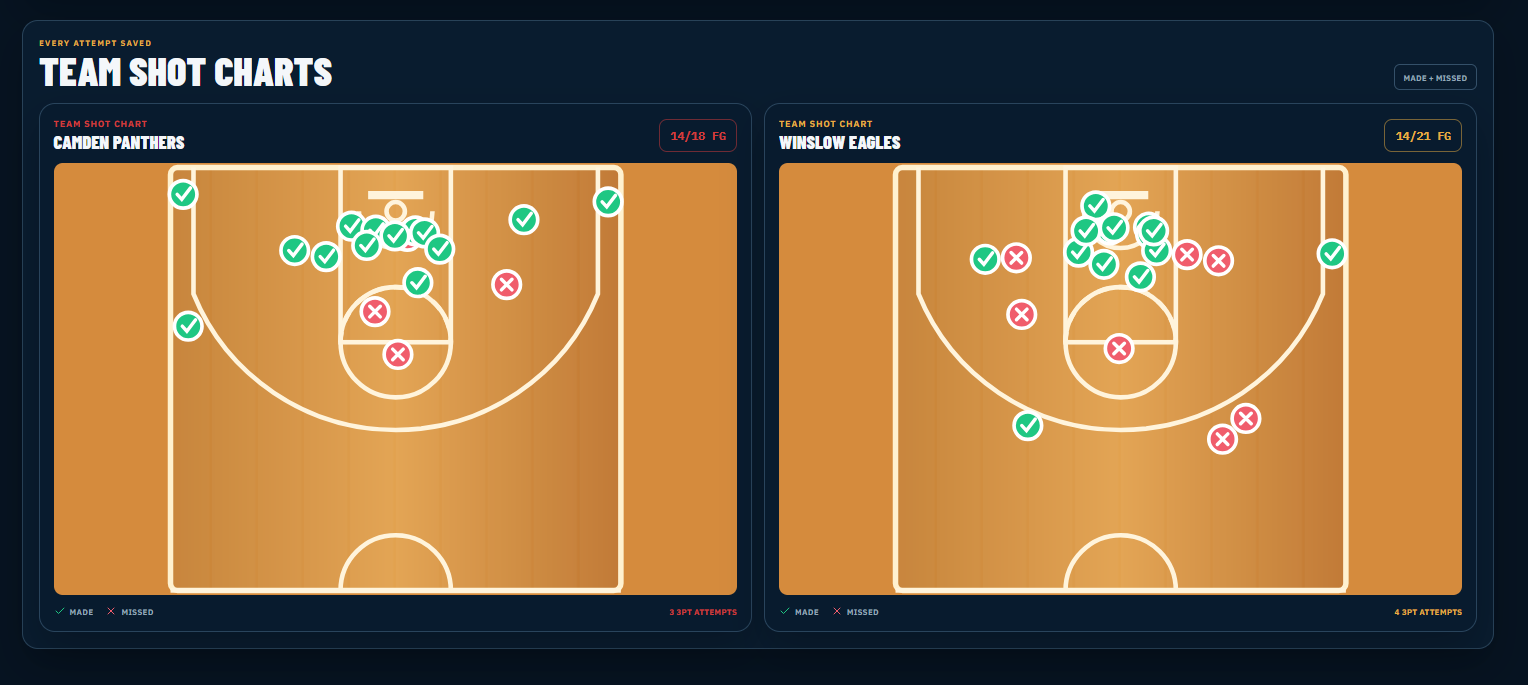
Tap the spot where the shot happened and mark it made or missed. StatRoar saves the location, identifies two-point and three-point attempts and connects every shot to the player and game.
Fast live entry Parent-controlled youth privacy Shareable athlete stories
REAL STATROAR SCREENExact court locations for individual players and complete teams
BUILT FOR REAL BASKETBALL
Basketball Shot Chart App
Tap exact basketball shot locations for makes and misses. StatRoar builds player and team shot charts with 2PT, 3PT and shooting percentages.
01
Record basketball shot locations in real time
The shot chart is part of the live stat workflow, not a separate post-game task. Choose made or missed, tap the location and StatRoar records the attempt for the selected player. The court geometry identifies whether the shot was inside or outside the three-point line so the box score and chart stay synchronized.
Tap-to-place made and missed attempts
Automatic two-point or three-point classification
Shot connected to player, game and period
Undo support for quick corrections
02
See shooting results by game, season or career
A single night can be misleading, but connected shot charts show repeatable patterns. StatRoar lets an athlete and family review one game, combine an entire season or look across the player's saved career. The chart stays paired with FGM-FGA, 3PM-3PA, free throws and shooting percentages.
Filter the statistics page by game
Season and career shooting views
Made-versus-attempted totals
Field-goal, three-point and free-throw percentages
03
Turn the shot chart into an actionable basketball record
Shot locations help explain more than a final percentage. Players can see where they are consistently effective, where attempts are coming from and which areas need focused practice. Coach StatRoar can use the logged StatRoar record to provide age-appropriate basketball feedback and workout ideas.
Identify high-efficiency shooting zones
Compare makes and misses visually
Connect patterns to age-appropriate workouts
Include shot results in player stories and profiles
Capture the action
Record the stats and shot locations that explain how the game was played.
Understand the performance
Review game, season and career totals in one connected basketball record.
Share the story
Turn verified results into player cards, profiles, box scores and recaps.
COMMON QUESTIONS
StatRoar answers
Does StatRoar draw the basketball three-point line correctly?
Yes. The court uses basketball geometry for the corner and arc, and StatRoar classifies the tapped location based on the actual three-point boundary shown in the tracker.
Can I see made and missed shots at the same time?
Yes. Made and missed attempts use distinct visual markers and remain on the saved chart so the distribution and efficiency are easy to compare.
Can shot charts be filtered by a single game?
Yes. The statistics view can select an individual completed game or combine results into season and career totals.
Does the shot chart work for a whole team?
Yes. Team games save the selected player's shot and can display individual player charts plus side-by-side home and visitor team charts.
Are free throws placed on the court?
Free throws are tracked as made and attempted statistics. Live-location tapping is used for two-point and three-point field-goal attempts.